
This article will teach you how to change your Google Voice number within minutes.
Google announced during the last days of 2021 that legacy Google Voice wouldn’t be available for personal accounts from February.
Legacy Google Voice allows you to easily change your Google Voice number without stress, but the narrative has changed.
Now, you have to first clear or delete your old Google Voice number before you can get a new Google Voice number.
The Google Voice app comes with features, such as:
- Making and receiving calls.
- Call forwarding
- Receiving text messages
- Voicemail message feature
- Call recording feature, e.t.c
Without the use of a physical SIM installed on their mobile devices.
Also, keep in mind that the Google Voice app is only available for Android devices, but can be accessed by iOS and other devices via their website. (Voice.google.com)
Now, without wasting much time, let’s learn how to change a Google Voice number.
How to Change your Google Voice number
Although it’s possible to change your Google Voice number from the mobile app, we’ll be using the web version for this article since the app doesn’t work for every device.
- On your browser, open the Google Voice webpage
- Sign in to your account using your Google account you used to claim your number.
Click on Settings at the top right corner - You’ll be taken to your Account page, where you can see your claimed Google Voice numbers.
- Click on Clear or Delete > then Clear number to permanently delete your Google Voice number.
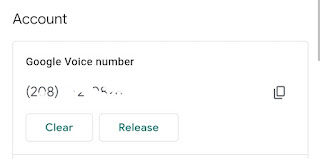
That’s all on Clearing your Google Voice number, now to claim a new number… Continue reading
- You should get a prompt saying “You don’t have a Google Voice number”, click on the “Get a Number” link
- Finally, enter your zip code and search for a number in your preferred area.
- Click on Select when you find the one that suits your preferences. Proceed to pay a one-time $10 fee to claim the new Google Voice number.
That’s all.
Remember, you can also port your number to Google Voice by clicking on the “Wear a number” option in your dashboard to transfer a number from your carrier to Google Voice.
I hope with this guide you’ve been able to change your Google Voice number successfully without hassle.
Let’s check out some frequently asked questions about Google Voice.
FAQs
That’s all on how to transfer your Google Voice number. Kindly share and drop a comment below.
