
Is it necessary to hide your profile picture from specific users on your contact list? Or to visitors who randomly looked up your display picture?
Well, let’s see how to hide your WhatsApp profile picture from everyone or only your contacts.
WhatsApp has grown to over 100 million users in the past few years, and thus, users’ privacy is a concern, as any minor mistake could jeopardize it. For this reason, users must also take heed and monitor the kind of content they post.
That aside, we’ll see how to hide your WhatsApp DP from your contacts. As most of us know, WhatsApp is used for personal and business purposes, and there are times when we want to display pictures that aren’t meant for everyone to see.
Why Hide WhatsApp DP?
There are many reasons why it is necessary to hide your DP from specific contacts or from everyone who might come across your page. Let’s highlight them…
- You can save WhatsApp DP as a screenshot, and it wouldn’t be cool for everyone to access it, especially when it’s your picture.
- It might be used to track you, as it is now possible to get a user’s location via WhatsApp.
- You can also set it up as an extra privacy measure so anyone who ain’t family or friends can’t see or save your WhatsApp DP.
How to Hide your Profile Picture on Whatsapp
Also, bear in mind that there’s no option to hide your profile picture from specific contacts or users. However, you can decide to remove those contacts from your list and then set the privacy to contacts only.
Having that in mind, let’s proceed…
- Launch WhatsApp and navigate to settings > Account > Click on Privacy
- Now, navigate to “Profile Photo” on the list
- You’ll notice “Everyone” as the default settings
- Click on it and change it to either,
2. Nobody: This option hides your display picture from family, friends, and enemies on WhatsApp.
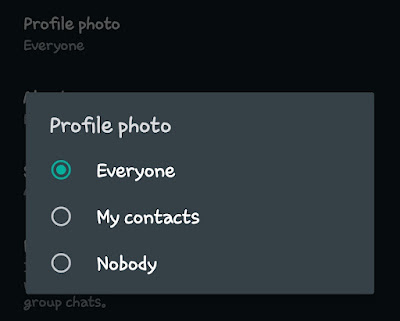
Once your DP is hidden, everyone who falls in the selected preference will only see a grey avatar as your DP.
That’s it.
As I said earlier, it is impossible to hide your DP from specific contacts, but you can decide to allow those on your contact list to view it. Also, refrain from saving contacts you need for one-time purposes, e.g., a delivery guy…
Kindly drop a comment and share.
