
Have you published or shared silly posts in the past? And would you like to delete or hide all posts with a click?
You don’t have to bother since we’ve got you covered on how you can quickly remove all Facebook posts at once.

Before now, we all had to scroll down our timeline and start deleting any posts we found unworthy.
The above process is a bit-by-bit system that can be time-consuming, especially if you have published enough posts.
But, with the below method, you’ll be able to remove multiple Facebook posts, remove multiple Facebook post tags, and also hide all Facebook posts at once without wasting much of your time.
How to Delete/Hide All Facebook Posts At Once
- Launch the Facebook App (not Facebook Lite) and sign in to the account
- Navigate to Profile > Click the “3 vertical dots” beside “Add a Story.”
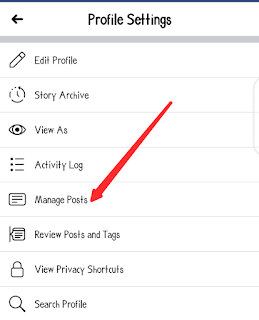
- You’ll be shown different menus under profile settings; click on Manage Posts
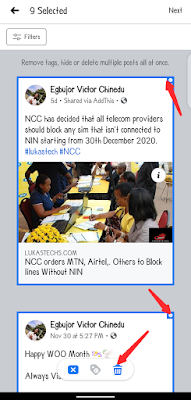
- Now, simply scroll and select the posts you want to delete or hide.
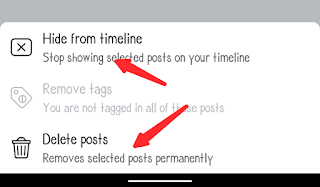
- Lastly, click on the “Delete Posts” or “Hide from Timeline” option at the bottom of the page.
That’s all.

I believe Facebook didn’t add the select-all option because of hackers and other security-related reasons.
Alternatively, you can use a bot tool to remove all friends at a click, but it has a side effect, and not only that, you’ve given a third-party app access to your account.
So, you should take your time and delete multiple posts.
Moreover, if you’re the account owner, then why would you want to clear all posts?
Kindly share the post and drop comments below.
