
Typing your full name, as it’s been used on Facebook, into any search engine will likely bring results that include your Facebook profile. This is possible because Facebook allows search engines like Google to index your profile by default.

This setting might be a handful if you’re a public figure or if you’re willing to let people look up your Facebook profile from inquiries made on search engines.
However, if you don’t want people to look up your social profile outside Facebook, then you can choose to remove it from search engines. Here’s how.
Firstly, navigate to Facebook and log in to your account {Illustrating with PC}
1. Select “Settings and Privacy” from the drop-down list
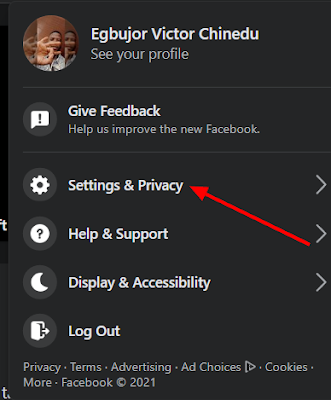
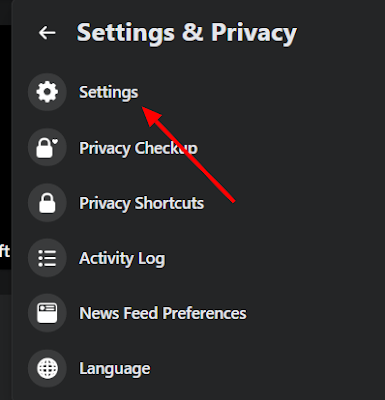
2. Navigate to Settings,
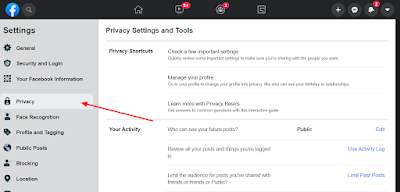
3. Click on “Privacy” from the left column
4. Select the “Do you want search engines outside of Facebook to link to your profile?” option from the “How People Find and Contact You” section (usually at the bottom)
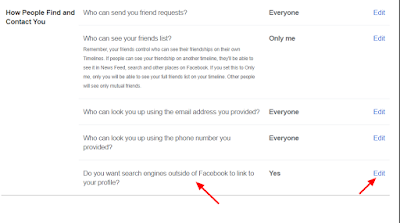
5. Click on the Edit icon next to the option
6. Untick the box and accept the change by clicking on the “Turn Off” on the Pop-up.

7. Lastly, click on “Close” to save your preference.
However, if you’re on Facebook Lite and would like to hide your profile without visiting the Facebook web then follow the guide.
1. Log in to the Facebook Lite App
2. Click on the 3 vertical lines by the top-right side to display the profile menu,
3. Scroll down and select “Settings.“
4. Select “Privacy Settings” from the “Privacy” menu
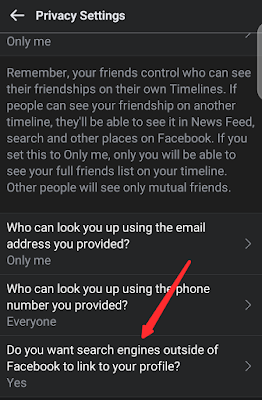
5. Scroll down a bit, and you’ll see the “Do you want search engines outside of Facebook to link to your profile?” option
6. Click on it and untick the box in the next window,
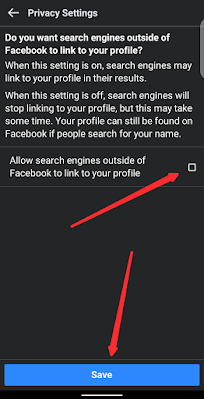
7. Finally, click on save to save your preferences.
That’s all about removing your Facebook profile from search engines like Google, Bing, Yandex, and the rest.
Once this feature is activated, your profile will only be visible to users on the platform, but it won’t be visible anywhere outside Facebook.
This setting will take at least a few weeks to come into effect. Even after Facebook processes the request on its end, your information and profile link will continue to exist in search engines’ cache and will surface in search results. Once Facebook relays the updated preference to sites such as Google, Yahoo, and Bing, they will take some additional time to reflect the changes.
In addition, while search engines will no longer be able to directly link your profile in results, they can crawl your publicly available information, like posts and your full name. Due to this loophole, anyone with the right keywords can still locate your Facebook profile through search engines.
Kindly share the post and drop a comment below.
