
In the past few months, TikTok has introduced a feature that lets you view your liked videos from your profile.

To maintain privacy, TikTok lets users decide whether to share their liked videos publicly.
This feature is great because it lets you revisit content you’ve liked and want to rewatch or share with someone.
Another platform, called Twitter, also has this feature enabled by default.
However, most TikTok users aren’t aware of the recent changes and are confused about where to look to see their recently liked videos.
In this article, I’ll show you how to set your liked videos to public or private, and how to view them on TikTok.
How to Allow Users to View Your Liked TikTok Videos
Remember, TikTok gives you the option to enable or disable this feature.
So, don’t be surprised when someone tells you they can’t view your liked videos, even though theirs are visible to the public.
Here’s how to go about it.
- Open the TikTok app and go to your profile.
- Click on the 3-lines at the top right corner of the page and select “Settings and Privacy.”
- Click on Privacy
- Under Interactions, click on “Liked Videos.”
- You can either set it to Everyone or Only Me.
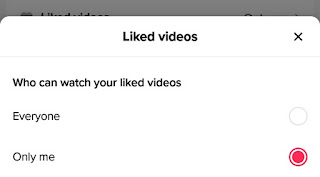
If you set it to everyone, all TikTok users can access your liked videos; the former means it’s only accessible to you.
Now, without wasting much time, let’s see how to look at your liked TikTok videos.
How to Look at Your Liked TikTok Videos
If you’re wondering how to look at your liked videos on TikTok, here’s how to go about it.
Remember, it depends entirely on how the person sets the visibility of their liked videos.
- Log in to TikTok
- Navigate to your profile
- Glide over to the “❤️” section on the left – usually the last section
- You should see a list of videos you’ve watched in grid format.
This will always be available to you, even when you set it to private. It’ll be represented with a closed sign.
You can now revisit the users’ page, rewatch the videos, or forward them to interested recipients.
That’s all there is to looking at your liked Videos on TikTok.
In conclusion, liking videos on TikTok is a simple process that can be done by following the steps outlined above.
Whether you’re looking for inspiration for your own videos, want to keep up with the likes of a particular user, or want to keep the video for sharing or to watch later, checking out your liked videos can be a great way to document your activities.
